Can you create multilingual sites with Webflow?
In a globalized world where the internet is everywhere, it’s essential for businesses and individuals to communicate with an international audience. A multilingual website is a valuable asset for reaching a broader, more diverse audience. But is it possible to create a multilingual website with Webflow? Webflow agency Gemeos answers all your questions in the article below!
Summarize this article with:

Multilingual websites: a key challenge
A multilingual website offers its content in several languages. That helps you reach a wider audience and adapt to each user’s specific needs.
Why build a multilingual website?
- Reach an international audience
- Improve the user experience
- Stand out from the competition
- Do SEO internationally (our Webflow SEO agency can help you with these challenges)
{cta}
The challenges of multilingual websites
- Translating and localizing content
- Managing different language versions
- Optimizing for search across multiple languages
Can you build a multilingual website with Webflow?
Yes, you can build a multilingual website with Webflow, but it does require a few adjustments and tweaks.
1. Use a folder for each language
In the Webflow Pages section, create a folder for each language you want to add to your site. For example, create a folder named "fr" for French and "en" for English.
Then all you need to do is duplicate your pages from one folder to another, making sure you translate the content properly.
2. Use a reverse proxy
In computing, a proxy server acts as a mediator between your device (computer/browser) and the internet (server). A reverse proxy works in the exact opposite way.
As you can see, a reverse proxy acts as an intermediary between your site visitors and your Webflow server. It automatically translates and displays your site content in each visitor’s preferred language.
Several reverse proxy providers are available, such as Cloudflare or Nginx. Compare features and pricing to choose the one that best fits your needs.
To learn more about the reverse proxy setup in Webflow, I recommend reading Benoît Eveillard’s detailed article.
3. Use a third-party solution
These solutions, similar to extensions, integrate with your Webflow site through JavaScript. Overall, they make setup easy with a simple interface
Webflow Localization

Webflow Localization is Webflow’s native solution for managing multilingual websites. Built directly into the Designer interface, it lets you create, translate, and customize pages by language or target region, while keeping full control over site structure and SEO optimizations.
Advantages
{usecases}
Disadvantages
Webflow Localization pricing

Weglot

Weglot is a website translation solution that makes it easy to translate and manage multilingual content.
Advantages
- Easy integration: Weglot integrates smoothly with Webflow
- Automatic translation: Weglot uses machine translation engines to provide initial translations, saving time.
- Manual translations and collaboration: Weglot lets you review and edit automatic translations. You can also invite collaborators to improve translation quality.
- No need to duplicate pages
Disadvantages
- Cost: Weglot offers a free plan to test the service with limitations (2,000 words). To unlock additional features, you need a paid subscription, and the plan can quickly become very expensive if you have a lot of words to translate and multiple languages.
- The sitemap is not updated automatically based on language
Weglot pricing
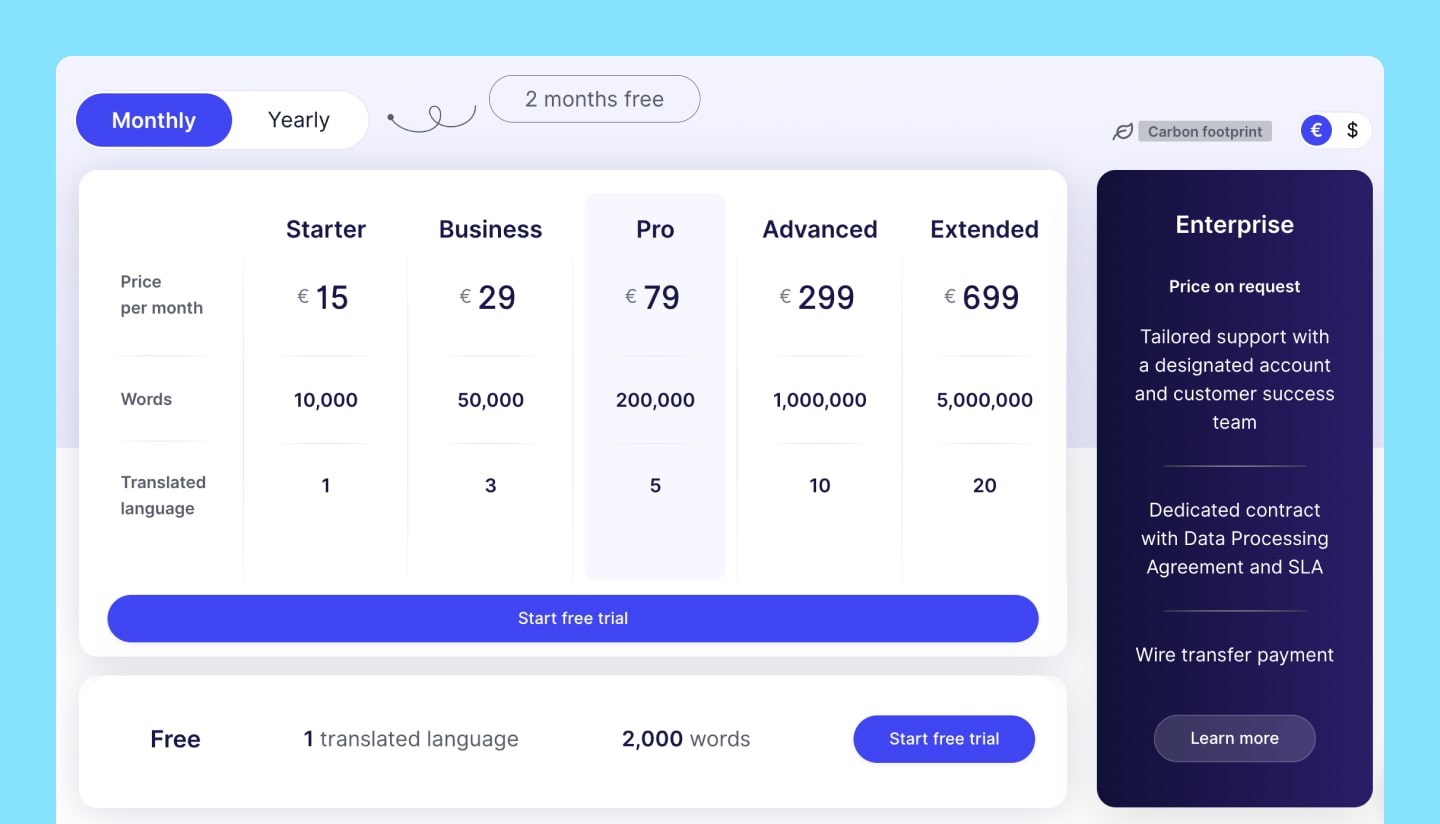
Linguana

Just like Weglot, Linguana integrates easily with Webflow.
Overall, Linguana offers the same advantages as Weglot, but it’s important to note that it offers a much more generous free plan.
With unlimited translation for one language and URL translation included, it’s a particularly strong choice if your site only needs to be translated into 2 languages.
Overall, Linguana is also much more affordable than Weglot. The only downside I see compared with Weglot is that you have to republish pages in Linguana if a change is made in Webflow.
Linguana pricing

How much does a multilingual website cost on Webflow?
A multilingual Webflow website costs on average between €3,000 for a simple landing page and €20,000, depending on the number of languages, the volume of content to translate, the translation method, and SEO needs. This budget includes design, development, multilingual management, and international SEO optimizations.
Multilingual website pricing on Webflow - Key takeaways
You can find more information in our dedicated article on Webflow pricing and website pricing.
SEO optimization for a multilingual website
To optimize SEO for your multilingual Webflow site, follow these tips:
Optimize title tags and meta descriptions
For each language, create unique title tags and meta descriptions optimized for target keywords.
This will help search engines understand each page’s content and rank them accordingly.
Create a multilingual sitemap
Generate a sitemap that includes all language versions of your pages to make indexing easier for search engines.
Use clear, easy-to-understand URLs
Make sure your page URLs are clear and easy to understand for both users and search engines. Include relevant keywords and avoid special characters.
Multilingual website on Webflow in 2025 - Key takeaways
Conclusion
As you can see, Webflow gives you the option to build a multilingual website using language folders, a reverse proxy, or third-party solutions such as Localization, Weglot, and Linguana.
Finally, to optimize your multilingual site’s SEO, it’s essential to work on title tags, meta descriptions, creating a multilingual sitemap, and using clear, easy-to-understand URLs.
By following these tips, you’ll be able to fully benefit from a multilingual website and expand your reach to a wider audience.
FAQ
What are the challenges of building a multilingual website?
The main challenges include translating and localizing content, managing different language versions, and optimizing for search across multiple languages.
How do you optimize SEO for a multilingual website?
To optimize SEO for your multilingual site, work on title tags, meta descriptions, create a multilingual sitemap, and use clear, easy-to-understand URLs for each language.
What is a reverse proxy and how can it help build a multilingual website?
A reverse proxy acts as an intermediary between your site visitors and your Webflow server.
It automatically translates and displays your site content in the visitor’s preferred language, making language version management easier.
What are the main differences between Weglot and Linguana?
Weglot is a simple no-code solution to integrate, which automatically translates content through a proxy, but it remains less customizable. Linguana offers more SEO control and a cleaner structure, with custom slugs and better multilingual optimization. Weglot is more mainstream, while Linguana is more technical. In terms of cost, Linguana is often more affordable.
What are the main differences between Localization and Weglot?
Webflow Localization is a native solution, built directly into the Webflow editor, designed for total control over local SEO (hreflang tags, custom URLs, translated content). Weglot, on the other hand, is an external solution that acts as an overlay: easy to set up, but with less flexibility around site structure and fine-grained SEO optimization. For a high-performing multilingual Webflow site, Localization offers a cleaner, more scalable approach.
What are the main differences between Localization and Linguana?
Linguana works through an external integration with Webflow, using a proxy system and technical limitations (especially around slugs and SEO tag control). Webflow Localization, as a native solution, allows advanced customization directly in the Designer, better UX/UI consistency, and multilingual management that is truly optimized for SEO. For sites built on Webflow, it’s currently the most coherent and reliable option.
Heading
Lorem ipsum dolor sit amet, consectetur adipiscing elit. Suspendisse varius enim in eros elementum tristique. Duis cursus, mi quis viverra ornare, eros dolor interdum nulla, ut commodo diam libero vitae erat. Aenean faucibus nibh et justo cursus id rutrum lorem imperdiet. Nunc ut sem vitae risus tristique posuere.

Lorem ipsum dolor sit amet consectetur.
Lorem ipsum dolor sit amet consectetur. Aliquam orci sagittis dignissim sapien praesent donec.





Lorem ipsum
Lorem ipsum dolor sit amet, consectetur adipiscing elit, sed do eiusmod tempor incididunt ut labore et dolore magna aliqua. Ut enim ad minim veniam, quis nostrud exercitation ullamco laboris nisi ut aliquip ex ea commodo consequat. Duis aute irure dolor in reprehenderit in voluptate velit esse cillum dolore eu fugiat nulla pariatur.

Published on

Mis à jour le
Meet Sacha Da Silva, Co-Founder and Product Designer at Gemeos. The creative head of the duo, he leads projects from start to finish and provides creative direction for the agency.
You might be interested in these articles